On 1 October 2026, Shopify will reject every attempt to create or update a storefront ScriptTag. Existing tags can continue to run for five months, but on 1 March 2027 Shopify will stop injecting them into storefront pages altogether.
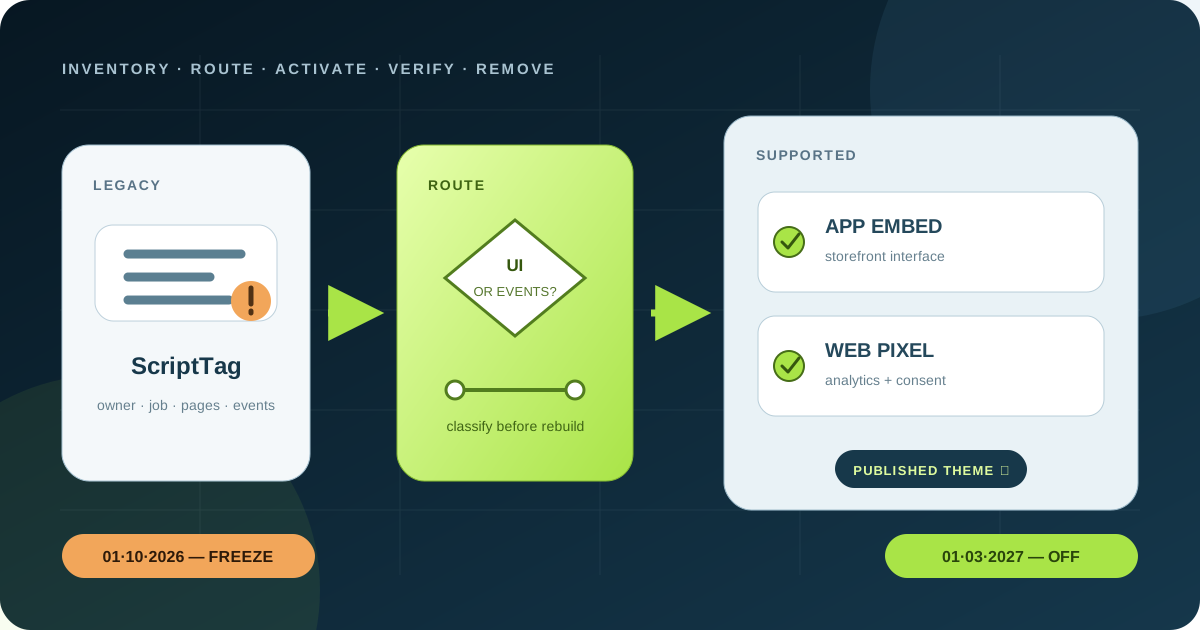
The first deadline is the dangerous one. A legacy chat widget, product badge or tracker may still look healthy after 1 October, while new installations and repairs already fail. Merchants should identify which storefront behaviour depends on an app; app teams should ship the replacement now and record whether it is active on every published theme.
The short answer: two dates, one controlled migration
| Date | Platform change | Business risk |
|---|---|---|
| 1 October 2026 | scriptTagCreate and scriptTagUpdate return a permission error on every API version; REST POST and PUT fail too | A new install, changed URL or repaired configuration cannot rely on the legacy path |
| 1 March 2027 | Shopify stops injecting remaining ScriptTags into storefront pages | Any dependent widget, personalization or tracking stops loading |
Read and delete operations remain available, so an app can still inspect and remove its own records. Pinning an older Admin API version does not postpone the change. Shopify also says that from 1 October an app installation can show a warning when the app uses ScriptTags but ships neither a theme app extension nor a web pixel.
Do not confuse ScriptTag with Shopify Scripts. ScriptTag is an Admin API resource that loads remote JavaScript on storefront or legacy order-status pages. Shopify Scripts was the Plus-only Ruby customization system for discounts, shipping and payments; that separate product stopped executing on 30 June 2026. “Additional scripts” and checkout.liquid also followed separate checkout-extensibility timelines.
Start with the job the code performs, not the word “script”
The March cutoff concerns JavaScript injected through the ScriptTag resource on online-store pages. It does not automatically remove ordinary JavaScript bundled with the theme, a supported theme app extension, a web pixel, Shopify Functions or server-side webhooks. Yet a store can use several of these at once, so filename searches alone do not prove ownership.
Classify every dependency by observable job:
- visible interface: chat launcher, popup, badge, reviews overlay, size guide or recommendation panel;
- behaviour without a fixed placement: personalization, accessibility helper, currency display or experimentation;
- measurement: page views, product events, add-to-cart, checkout and purchase conversions;
- checkout or order-status customization;
- server-side work: discounts, fraud checks, fulfilment, catalog sync or webhooks.
This classification prevents a common category error. A tracking tag should not be rebuilt as a DOM-manipulating storefront widget merely because both were once JavaScript. A discount rule does not belong in an app embed. And a widget cannot move into a web pixel because pixel sandboxes are not a general-purpose page DOM.
Build one inventory from merchant and developer evidence
A merchant rarely has enough evidence in one admin screen. Create a worksheet with app or vendor, script host, business function, pages, owner, replacement, published-theme status and test result. Then collect evidence from four places.
- Installed apps and contracts: ask each vendor whether the current version uses ScriptTag and whether it ships an app embed, app block or web pixel. Request a release date and test instructions, not a generic “compatible with Shopify” answer.
- Published storefront: record Network requests and rendered source across home, collection, product, cart and account journeys. Map unfamiliar JavaScript hosts to a vendor. Repeat while logged out and after consent choices.
- Theme and customer events: inspect Theme settings → App embeds, app blocks on relevant templates, theme code edits and Settings → Customer events. Look for the same analytics platform installed in more than one place.
- App-side API evidence: the maintaining team should query its ScriptTags, record
id,src,displayScopeand cache setting, and connect each record to a replacement. Preserve a dated export before deletion.
An app being installed does not prove its storefront component works. App embed blocks are disabled by default after installation and are enabled per theme. Publishing a staging or seasonal theme can therefore turn off a previously working replacement. The inventory needs the active published theme, not only the app version.
Choose the supported Shopify surface
| Legacy job | Primary replacement | Important constraint |
|---|---|---|
| Floating widget or code required across storefront pages | Theme app extension with an app embed block | Merchant must save activation; status belongs to the published theme |
| Inline reviews, badges or UI placed in a section | App block | Theme needs JSON templates and an app-compatible section |
| Analytics, advertising or behavioural events | Web pixel app extension; custom pixel only where appropriate | Runs in a sandbox and must use Shopify customer events and consent signals |
| Order-status interface | Customer account UI extension | Storefront ScriptTag migration does not restore checkout access |
| Discount, delivery or payment logic | Shopify Functions or another supported server-side surface | Do not place authoritative pricing logic in browser code |
App embed blocks work on vintage and Online Store 2.0 themes. They can load through the head or body and may be limited to selected templates. App blocks are better when the merchant should position a visible component within a page section. Use a post-install deep link to open the current theme editor with the embed prepared for activation, and explain that the merchant still needs to preview and save.
Admin-created custom apps are a special case: Shopify says they cannot use app extensions. If one currently injects a ScriptTag, the supported migration may require a properly distributed app or, where no extension is possible, carefully owned theme code. Theme edits can survive uninstall and interfere with automatic upgrades, so document that exception rather than treating it as the default.
Do not trade an outage for duplicate execution
Shopify’s sequence is simple: build the theme app extension, send the merchant through the activation deep link, confirm the embed is active on the published theme, then delete the old ScriptTag. Reversing the last two steps creates a gap. Leaving both paths live can render a widget twice, attach duplicate event handlers or count a conversion twice.
For an app developer, use app.extensions() in the Shopify admin to distinguish an active block from one merely available. If activation must be checked from the backend, inspect the published theme’s config/settings_data.json with the required read_themes access. Recheck after a theme publish.
Use a per-shop migration state such as legacy_only, replacement_available, replacement_active, dual_run, legacy_removed and verified. Time-limit any dual run and make event deduplication explicit. Keep rollback at the replacement layer: after 1 October you cannot assume you will be able to recreate or edit the old ScriptTag.
Rebuild measurement around events, consent and reconciliation
Web pixels receive Shopify customer events through a controlled API. App pixels run in a strict sandbox; custom pixels run in a lax sandbox. Traditional code that scrapes or writes the top-page DOM may not work, and a sandbox URL can differ from the storefront URL. Map every required field to a documented standard or custom event before choosing the destination.
Web pixel app extensions integrate with Shopify’s customer-privacy signals. In consent-required regions, callbacks run after consent and previously registered events are replayed. That helps, but it does not make the implementation automatically lawful or accurate. Confirm that a third-party consent platform synchronizes choices with Shopify, and obtain appropriate privacy review.
Run both event-level and business-level reconciliation:
- one page view, product view, add-to-cart, checkout start and purchase produces the intended event once;
- event ID, order ID, currency, value, discounts, taxes and shipping map correctly;
- accepted, denied and changed consent states behave as designed;
- browser blockers, Safari and mobile sessions degrade without breaking checkout;
- ad-platform conversions are compared with Shopify orders over a defined window, allowing for consent, attribution and processing differences.
Do not promise identical totals between platforms. Aim for explained differences, no duplicate event path and an alert when the variance moves outside an agreed band.
Release gates for every migrated storefront dependency
| Gate | Pass condition |
|---|---|
| Coverage | Every legacy tag has an owner, business job and destination or retirement decision |
| Activation | Replacement is active on the published theme, not only installed or enabled on a draft |
| Journeys | Home, collection, product, cart, search, account and locale paths work on mobile and desktop |
| Duplication | One widget instance and one intended analytics event per action |
| Privacy | Accept, reject, partial and changed consent states match policy |
| Performance | Before/after network, LCP, INP and JavaScript cost stay within the release budget |
| Theme publish | Publishing a fresh theme triggers an activation check and merchant instruction |
| Removal | Legacy request disappears; replacement remains observable and rollback is documented |
Test with production-like data but without sending live marketing conversions. For visual components, cover keyboard use, focus, reduced motion, screen width and translated content. Shopify recommends small entry bundles and interaction-based loading for non-critical code; the migration is a useful moment to remove abandoned vendors and page-global JavaScript rather than reproduce every old performance problem.
A seven-day plan before the 1 October freeze
- Day 1 — inventory: list apps, ScriptTag records, storefront requests, customer events and theme edits.
- Day 2 — classify: name each business job and route it to app embed, app block, web pixel, UI extension, Function or retirement.
- Day 3 — ownership: obtain vendor dates; assign internal owners for custom and abandoned integrations.
- Days 4–5 — implement: ship the extension or pixel, activation deep link, status detection, consent mapping and telemetry.
- Day 6 — cut over: activate on a controlled shop or theme, prevent duplicate execution and delete the matching tag only after proof.
- Day 7 — verify: test journeys, conversions, privacy and performance; alert on legacy calls and inactive embeds.
If a vendor cannot answer before 1 October, preserve evidence and a fallback plan. Existing tags continue until March, but the store should not add new business dependence to an integration that can no longer repair its legacy injection path.
Frequently asked questions
Will every Shopify app stop working on 1 October 2026?
No. Existing storefront ScriptTags can still run until 1 March 2027. On 1 October, creation and updates stop. Apps already using supported extensions, pixels or server-side surfaces are not broken by this specific cutoff.
Can we stay on an older Shopify API version?
No. Shopify says the create and update failure applies to every API version. Treat it as a platform rule, not an ordinary version sunset.
Should a tracking ScriptTag become an app embed?
Usually Shopify directs analytics, conversion and behavioural collection to a web pixel. An app embed is for storefront code or UI. Verify the event and sandbox requirements before migrating.
When should the old ScriptTag be deleted?
After the replacement is active on the published theme and its critical journeys pass. Running both can duplicate UI or analytics; deleting first can create an outage.
What happens when the merchant publishes a new theme?
An app embed is enabled per theme. Recheck activation on the newly published theme and guide the merchant through the theme-editor save if needed.
Sources and verification date
Verified 23 September 2026 against Shopify’s official ScriptTag deprecation overview, storefront migration timeline, theme app extension migration guide, activation and configuration documentation, web pixel and consent documentation, merchant pixel migration guide, separate Shopify Scripts timetable, and app performance guidance.
Rendframe can inventory storefront dependencies, build the right extension or event pipeline, coordinate vendor cutovers and test measurement, privacy and performance. Begin with the third-party script audit, add the Core Web Vitals release checks, or send us one Shopify store domain and a redacted app list.